
Forex CRM for sales teams: can someone else pick up the client?
Evaluate forex CRM sales workflows through client ownership, activity history, tasks and handovers, with practical checks for brokerage sales leaders.
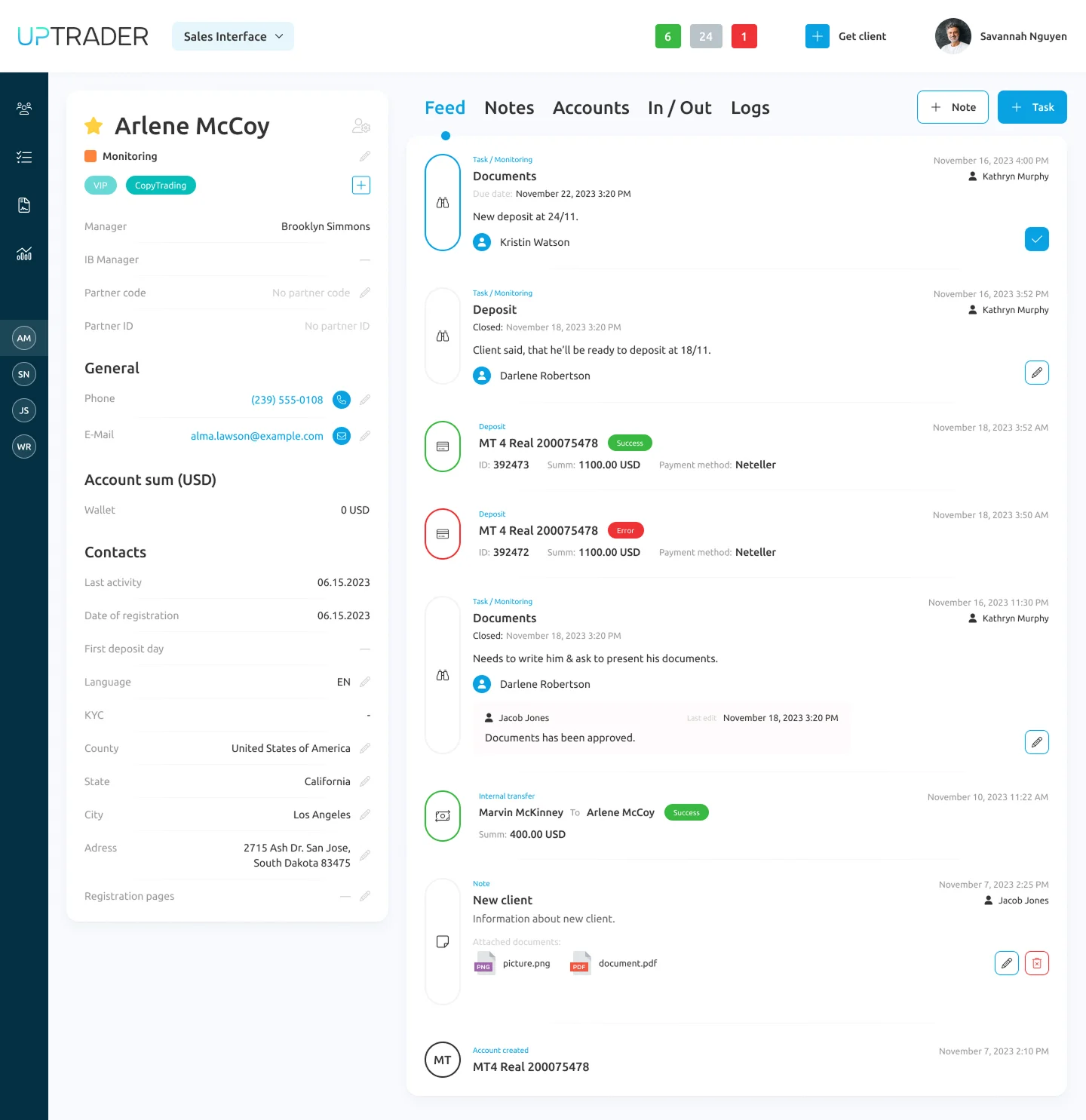
A useful forex sales CRM makes the next action clear and gives the next person enough context to take it. Evaluate assignment, history, tasks and handovers before judging the appearance of the pipeline dashboard.
The simplest test is to ask a colleague who has not seen the account to pick it up. Can they tell what happened, what was agreed and what should happen next?
Give every active record an owner
Define what ownership means at each stage. A new enquiry might belong to a queue before it belongs to an individual. An existing client may need a different team from an unqualified lead.
Whatever the structure, make unassigned and overdue work visible. A record without an owner is not a pipeline stage; it is a question your team has not resolved.
During a demonstration, assign a client, reassign it and inspect the receiving user's view. Check that the person has the information and permissions needed to act. Then try the same exercise with a manager who oversees several people.
Make the next action specific
“Follow up” is not a useful task by itself. Record what is needed, who owns it and when it is due. A note such as “send the requested account information after verification review” creates a different action from “call again tomorrow”.
Choose a small set of task rules the team can maintain. Too many mandatory fields can produce incomplete or meaningless entries. Too few can leave every handover dependent on memory.
Ask the people doing the work to complete several realistic records. Their experience is more informative than an administrator filling out an ideal example.
Review the history in order
The next employee should be able to distinguish a client's request, an internal note and a completed action. Check whether timestamps and ownership are clear. Ask how the team finds an unresolved issue without reading an entire account history.
Do not put unnecessary sensitive information into free-text sales notes. Agree what belongs in the appropriate document or compliance workflow instead.
A complete activity history helps a handover, but it does not establish that every external communication channel is integrated. Confirm the channels and logging behaviour in your actual scope.
Choose measures that lead to decisions
Useful operating measures include time to first assigned action, overdue tasks, unassigned records and records with no next step. Define the calculation and starting event for each measure.
Review quality alongside activity. More calls do not prove better sales performance, and a closed task does not prove the client's issue was resolved. Sample actual records to understand what the numbers represent.
Avoid promising a revenue multiplier from software. Performance also depends on acquisition, staffing, process, market conditions and the offer itself.
What UpTrader documents
UpTrader's sales module is designed for brokerage sales teams. The supplied presentation describes client distribution, manager and department performance analysis, task management and customer profiles with activity logs.
Those functions make it relevant to this evaluation. We do not repeat the presentation's numerical uplift claims because no supporting measurement method was supplied.
Ask to see the sales dashboard, a client profile and the task view with a realistic handover. The screenshots included with this article's implementation pack are actual UpTrader product images, not a reconstruction of the interface.
Finish the demo with a handover
Create a client record, log a request, assign a task and move ownership to a second user. Ask that user to explain the next action without help from the demonstrator.
If they can do it, you have evidence of a usable workflow. If they cannot, you have a specific issue to investigate before rollout.
Book an UpTrader CRM sales-workflow walkthrough.
Product reference: UpTrader Sales Module.
Ready to launch? Book a free consultation.
Talk through your setup, jurisdiction, and infrastructure with our team — no obligation, no sales pitch, just practical advice.
Book a free consultation